Advanced Mobile UI Design: Principles for Creating Intuitive Apps
Created: Feb 05, 2025
Updated: Jun 23, 2026
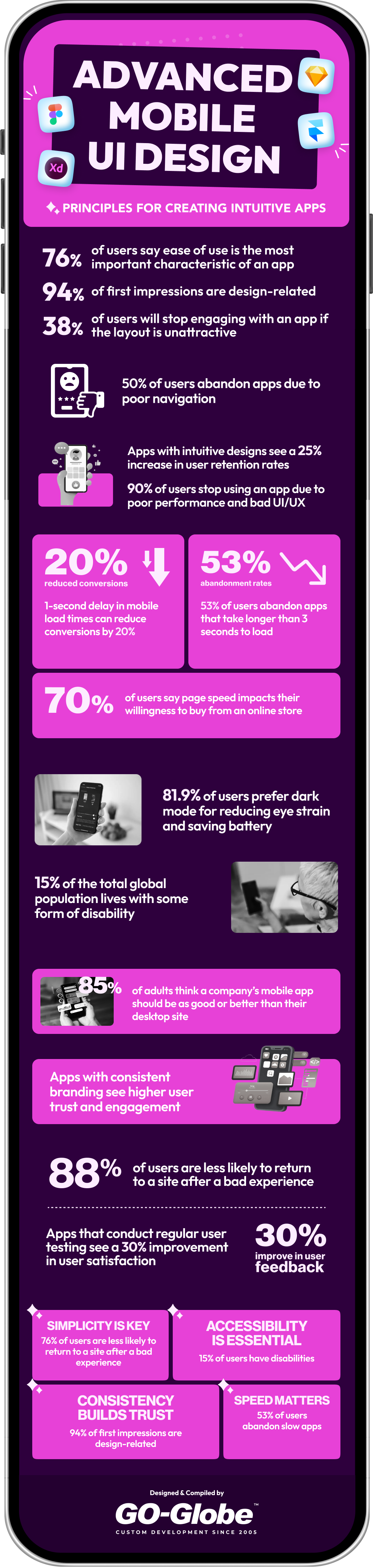
Mobile apps are a significant aspect of our daily lives. From shopping to working out, we use our mobiles for almost every purpose. A survey by Oberlo shows that 52.08% of web visits now come from mobile devices, outpacing desktop visits at 47.92%. This change to mobile makes mobile UI design more critical than ever. Creating a smooth and engaging app is necessary, with everyone using their phones for various tasks. Building a user-friendly interface for a mobile app is the key to keeping users happy. It ensures their experience is smooth, even on smaller screens.
Let’s explore the key principles of best mobile app UI design through examples from top apps. It will show how these principles help create user-friendly experiences, leading the market.
Mobile User Interface (UI) design is the method of designing an app's visual elements and interactive capabilities. It focuses on how users engage with the app through touchscreens, buttons, icons, and other controls. Mobile UI design aims to create an intuitive, user-friendly, and visually appealing experience. It also enhances the usability and accessibility on small screens. This includes issues with format, navigation, typography, colorations, and responsiveness to different devices. Good mobile UI design guarantees users can effortlessly understand and navigate the app, enhancing their overall experience. This aspect plays a crucial role in mobile app development Dubai, as it directly influences user satisfaction, engagement, and long-term retention.
A mobile app interface with clear, consistent branding for a user-friendly experience.
Fundamental Principles of Mobile UI Design
It is important to follow the key principles to create a successful mobile UI design. These principles make sure that the app is not only visually good but also easy to use. Here is a detail of some fundamental concepts:
1. Simplicity and Clarity
Simplicity is the heart of the best mobile app UI design. Mobile phones have small screens, so it is essential to create within the limited space. A cluttered interface can distract users. This makes it harder for people to focus on key features and actions. Keeping the elements simple and clear means placing only the most required icons on the screen.
How to apply it:
Use white space to create separation between elements.
Limit the number of buttons and menus visible at once.
Avoid unnecessary text, and focus on key actions and content.
Choose icons that are easy to understand without much explanation.
A clean, minimalist strategy helps users focus on what is important without distractions. This simplicity improves user experience, as people can easily grasp how to use the app.
2. Visual Hierarchy
Visual hierarchy is the process of arranging elements on a screen. It requires a way that grabs the attention of the user. By strategically using size, colour, and placement, you can make sure that the most important information looks appealing and that users can follow a sequence of actions.
How to apply it:
Use a prominent font size for headings and a smaller font for supporting text to create clarity between them.
Use bold or bright colours to highlight key buttons or actions (e.g., the “Submit” button).
Place primary actions (like navigation or call-to-action buttons) at the bottom of the screen for easy thumb access.
Use enough space to separate sections and avoid clutter on the screen.
This principle makes sure that users intuitively know where to look first and what actions they should follow. This process makes their navigation smoother through the application.
3. Make Navigation Predictable
Predictable navigation means using the design patterns that users are already familiar with. If users are forced to learn how to use an app from the start, it can create confusion and frustration. When they can easily understand the layout and structure of the app, they will be more efficient in using it.
How to apply it:
Follow platform-related design guidelines. (e.g., iOS Human Interface Guidelines or Android Material Design) for common button placements and interaction patterns.
Place the navigation bar at the bottom of the screen where users’ fingers can reach easily.
Use standard icons, such as a home button or back arrow, so users immediately know their function.
When navigation feels familiar, users can navigate easily through the app. It reduces frustration and improves the overall experience.
4. Consistent Branding
Branding is a key concept to develop an app that users can be familiar with and relate to. A strong mobile UI design should present the identity of the brand. It can be done through the proper use of colours, typography, and logos. Consistency in design helps users feel comfortable and builds trust as they begin to link the app with a proper brand personality.
How to apply it:
The colours, fonts, and logos must be similar throughout the app.
Maintain the same visual style across all screens and interactions. So users don’t feel like they are switching between different apps.
Use icons, buttons, and other visual icons that reflect the tone and brand voice.
Consistency in branding not only increases the app’s identity but also helps users feel more comfortable with the app’s environment.
5. User-Friendly Forms and Input
Forms are an essential part of many apps. Whether for sign-ups, surveys, or checkout. However, poorly designed forms can be frustrating and cause users difficulty performing their tasks. A user-friendly form is so simple, efficient, and easy to navigate. It minimizes the time and effort required to complete the input.
How to apply it:
Group related fields together (e.g., name, email, phone number).
Use clear, concise labels and provide directions if needed.
Use input masks to help users enter information properly (e.g., formatting phone numbers or dates).
Use auto-complete and auto-correction features to avoid mistakes.
By making forms intuitive and easy to complete, users are more likely to finish their tasks without confusion. It leads to a smoother and clearer experience.
6. Intuitive Navigation
Intuitive navigation ensures that users can easily understand how to move around the app without instructions. Navigation should be logical and predictable. It allows users to complete tasks with short steps. If users can not find what they need easily, they may not use the app altogether.
How to apply it:
Use familiar and consistent navigation patterns, such as bottom navigation bars or side menus.
Group related features together so users don't need to go through multiple screens.
Make sure buttons and links are clearly labelled to indicate their action. (e.g., "Go to Cart" instead of just "Cart").
Include a search feature for applications with lots of content.
When users don’t have to think about how to navigate, they can focus on managing their tasks without frustration.
7. Accessibility and Inclusivity
An accessible app can be easy to use for everyone, including those with disabilities. Accessibility is not only about compliance; it is about making sure all users can have a pleasant experience with your app.
How to apply it:
Provide options to increase text size for customers with visual impairments.
Make sure that the colour contrast is sufficient for readability. Also, consider the users with colour blindness.
Add voice commands or screen reader support for those who are visually impaired.
Use Alt text for images so visually impaired customers know what the image contains.
When you design for accessibility, you develop a smooth experience for everyone. Make sure that your app is usable by the largest audience possible.
8. Feedback and Response
Feedback lets users know that their actions are being processed. Whether it is a button press, a form submission, or a work completion, users need confirmation that their action was submitted. Without feedback, users may feel confused or uncertain about their actions.
How to apply it:
Provide visual aid or haptic feedback for button presses. (e.g., a slight animation or colour change when tapping a button).
Show confirmation messages after actions are done. (e.g., “Form submitted successfully” or “Item added to cart”).
Use progress indicators when processes take longer. (e.g., loading bars or moving icons).
Feedback from abest mobile app development company in Dubai ensures users that the app is responsive and their input is being processed. It creates a more confident and fluid user experience.
9. Streamlined Onboarding
Onboarding is the first interaction a user has with any app. A reliable, smooth onboarding method is critical in maintaining customers and helping them find a way to use the app right away. A proper onboarding experience sets the tone for the rest of the app usage.
How to apply it:
Keep onboarding short and focused on the essential steps (e.g., sign-up or account creation).
Use tooltips or highlights to guide users about the key features through the apps.
Allow users to skip onboarding if they are already familiar with the features.
Show users how to perform critical actions right away.
Effective onboarding makes users feel comfortable and confident using the app. It leads to higher user engagement and retention.
10. User Testing and Iteration
No design is perfect from the beginning. Continuous working based on user feedback is critical to building an app that meets users' needs. User testing lets you know the pain points and usability issues before a wider audience uses the app.
How to apply it:
Conduct usability tests with users to see how they interact with the app.
Gather reports through surveys or interviews to understand what is helpful and what is not.
Regularly update the app to fix issues and enhance functionality based on the feedback received.
Use A/B to try out various layout versions and determine which performs better.
By constantly testing and iterating, you could ensure your app evolves to fulfill user needs and expectations. It also results in a continuously better experience.
Designing an intuitive mobile app requires understanding the unique interface principles of each platform. Both Android and iOS have distinct visual languages, interaction models, and navigation patterns that define how users experience mobile applications. To create truly advanced mobile applications, designers must adapt their approach while maintaining a unified brand identity and intuitive flow across all platforms.
Android UI Design: Material Design Patterns & Intuitive Interactions
Android UI design follows Google’s Material Design framework, which emphasizes depth, motion, and meaningful transitions. Using elements like floating action buttons, cards, and bold colour schemes helps users identify hierarchy and function instantly. Designers should implement intuitive app interface solutions by using consistent iconography, tactile feedback, and gesture-based navigation that feels natural to Android users. The goal is to ensure a seamless, intuitive mobile app interface design that aligns with the platform’s expectations while promoting discoverability and simplicity.
iOS Human Interface Guidelines: Intuitive Gestures & Visual Clarity
Apple’s Human Interface Guidelines (HIG) focus on clarity, depth, and deference. In iOS app interface design, minimalism and whitespace guide users’ attention, while intuitive gestures—like swipe actions, pull-to-refresh, and edge-based navigation—create fluid and predictable experiences. Designing with visual clarity and consistent motion fosters an expérience mobile and intuitive, that feels elegant and responsive. For brands offering mobile user interface services, following Apple’s HIG ensures smooth onboarding and consistent usability across devices.
Cross-Platform/Hybrid Apps: Ensuring Consistency and Intuitiveness
In the mobile UI design services market, creating cross-platform or hybrid apps demands balancing platform differences with brand consistency. Whether building in Flutter, React Native, or other frameworks, maintaining an intuitive mobile app design means respecting each platform’s conventions while using shared UI patterns for familiar navigation. Consistency in typography, icons, and gestures ensures that the mobile user interface feels cohesive, intuitive, and aligned with your brand app design across Android and iOS ecosystems.
Designing Intuitive User Flows for Advanced Mobile Applications
Building advanced mobile applications isn’t just about visual appeal — it’s about how effortlessly users can move through your app. Every tap, swipe, or pause tells a story about your mobile user interface. When done right, an app feels intuitive, natural, and almost invisible — letting users focus on their goals, not the design itself. The best intuitive mobile app experiences emerge when designers think like users, not developers, and remove every obstacle that interrupts flow.
Mapping Key User Tasks & Minimizing Friction: Start with empathy. What are users really trying to accomplish? Map out their key tasks and highlight moments where friction might occur — unnecessary logins, redundant screens, unclear calls-to-action. Each of these points is an opportunity to simplify. The more direct and predictable your pathways, the more “intuitive” the experience feels. In mobile app interface design, micro-optimizations — like auto-filling forms, contextual shortcuts, or clear back navigation — can make the difference between a good app and one users love to return to.
Onboarding Flows That Feel Personalised & Intuitive: First impressions matter. Onboarding is your user’s handshake with your brand. Instead of static tutorials, design dynamic onboarding that adapts to context — skip steps for returning users, surface relevant features, and personalize tone. The goal is to make onboarding feel like part of the product, not a barrier to entry. In the mobile UI design space, personalization builds trust and makes your brand app design feel more human.
Non-Custodial Key Backup: UI Patterns That Make It Intuitive on Mobile: Security tasks don’t have to feel complicated. For non-custodial key backups, use simple UI patterns: progressive steps, visual metaphors (like puzzle pieces for backup phrases), and confirmation states. Explain actions in plain language, not technical jargon. A clear, human-centric approach transforms what could be intimidating into something intuitive and empowering. In the advanced mobile UX design service market, this kind of clarity defines the future of intuitive app interface solutions.
Adaptive UI for Mobile: Responsive, Foldables & Multi-Device
Mobile UI design must go beyond static layouts. An adaptive mobile user interface responds fluidly to varying screen sizes, orientations, and device types — from smartphones and tablets to foldables and wearables. Designing advanced mobile applications now means preparing for flexibility, ensuring the experience remains seamless whether users are holding their phones vertically, unfolding a tablet, or switching between screens.
Handling Different Screen Sizes, Orientations & Foldable Devices
Modern app user interface design should anticipate dynamic changes in screen states. For foldable and rotating devices, interfaces must resize and reposition elements intelligently. Portrait mode should focus on clarity and hierarchy, while landscape and unfolded views can reveal additional content or functionality. The result: an intuitive mobile app that feels fluid and responsive in every orientation.
Adaptive Layouts & Breakpoints for Mobile Design UI
Successful adaptive design uses breakpoints to reflow content gracefully without breaking visual structure. Scalable grids, flexible typography, and fluid spacing help maintain usability. A responsive mobile app interface design supports consistent readability and navigation across various resolutions and screen densities.
Ensuring Intuitive Experience Across Devices
The goal of adaptive UI is consistency. Whether switching from Android to iOS, phone to tablet, or foldable to desktop, the intuitive app interface solution should preserve core gestures, icons, and navigation. This unified experience strengthens brand trust and ensures a cohesive journey across all mobile user interface touchpoints.
Common Mistakes in Mobile UI Design & How to Avoid Them
Mobile UI design plays a crucial role in user experience, and even small mistakes can lead to frustration and abandonment. Below are some common mistakes and how to avoid them:
Overcrowded Interfaces: One of the most frequent design blunders is cluttering the screen with too many elements. An overcrowded interface overwhelms users and makes it difficult for them to focus on important tasks. To avoid this, embrace simplicity by prioritizing key features and content. Use white space effectively and ensure that elements like buttons, images, and text are strategically placed, giving users room to breathe. Keep interfaces clean and user-friendly by eliminating any unnecessary items or combining features when possible.
Poor Navigation Structure: Confusing or complicated navigation leads to frustration and can drive users away. A poor navigation structure makes it hard for users to find what they need quickly. To address this, ensure that the navigation bar is intuitive, with clearly labelled sections. Use familiar patterns such as bottom navigation for mobile apps, and organize content logically. Users should be able to predict where they need to go without thinking twice. Consistent and predictable navigation improves overall usability.
Ignoring Platform Conventions: Each platform, whether iOS or Android, has its own set of design conventions. Ignoring these guidelines can result in a jarring user experience. It’s essential to follow the platform’s design guidelines to provide a consistent and familiar experience for users. For instance, iOS apps often use a bottom navigation bar, while Android prefers a side drawer. Adhering to these conventions ensures that users feel comfortable navigating the app.
Non-intuitive Input Forms/Flows: Non-intuitive forms or input fields can lead to user errors and abandoned tasks. Avoid unnecessary steps, make forms easy to fill out, and provide helpful cues. Use field labels, auto-formatting, and validation messages to guide users. The input process should feel seamless, reducing friction and enhancing user satisfaction. Keep it simple, concise, and optimized for mobile screens to create an intuitive flow.
When reviewing a mobile app interface, ensuring it is intuitive, user-friendly, and efficient is essential. Below is a 10-point checklist that will guide you in auditing your mobile app design in Dubai, focusing on key areas like simplicity, hierarchy, navigation, and more. Use these quick heuristics to evaluate whether your design meets user expectations and provides a seamless experience.
1. Is the design simple and clutter-free?
Yes / No A simple design focuses on the essentials, minimizing distractions. If the interface feels crowded with too many buttons, images, or text, it could overwhelm the user. A good design should focus on clear calls to action, vital content, and a clean layout.
2. Does the app maintain a clear visual hierarchy?
Yes / No Visual hierarchy ensures users can easily differentiate between important and less important elements. Larger, bolder fonts or more prominent buttons often represent primary actions, while secondary options are visually smaller or less contrasting. Check if the most important actions stand out, and less critical elements are scaled back.
3. Is the navigation structure intuitive and easy to follow?
Yes / No A well-structured navigation system is critical for a smooth user journey. The app should have clear, logical paths for users to navigate from one section to another. Primary actions, such as Home, Search, and Settings, should be easily accessible, often placed in a bottom navigation bar or a prominent menu.
4. Are interactive elements, like buttons, easy to identify and use?
Yes / No Buttons and interactive elements should be easily distinguishable from non-interactive content. They should stand out enough through color, size, and shape to make them obvious and clickable. Check if buttons are large enough for easy tapping and placed in intuitive locations.
5. Is the text legible with appropriate font sizes and contrast?
Yes / No Text should be easy to read at all sizes. Ensure font sizes are legible, especially on small screens. Pay attention to the contrast between text and background to avoid readability issues. Avoid excessive text; keep it concise to maintain user engagement.
6. Does the app adhere to platform-specific design conventions (iOS/Android)?
Yes / No Following platform conventions ensures that users feel comfortable and familiar with the app’s design. For example, iOS apps often use bottom navigation bars and swipe gestures, while Android apps may use side navigation drawers. Make sure the design aligns with the specific platform guidelines for a consistent user experience.
7. Are actions predictable and consistent throughout the app?
Yes / No Consistency is key for usability. Actions, gestures, and icons should function the same way across the entire app. If a swipe gesture works in one part of the app, it should work in others. Likewise, icons and actions should follow established norms, so users don’t need to relearn interactions.
8. Does the app provide clear feedback after user actions?
Yes / No Feedback helps users understand the result of their actions. Whether it’s a button press, form submission, or error message, the app should notify users of the outcome. Check for loading indicators, success messages, or error alerts when interacting with the app to ensure the user knows what’s happening.
9. Are the input forms and flows easy to follow and user-friendly?
Yes / No Input forms should be intuitive and easy to complete. Avoid overwhelming users with too many fields at once. Use smart input fields (e.g., auto-formatting for phone numbers) and clear field labels. Check that error messages are helpful and appear as soon as possible to prevent frustration.
10. Is the app optimized for different screen sizes and orientations?
Yes / No A responsive design is vital for ensuring your app works smoothly on different devices, whether a smartphone or tablet. Test the app in both portrait and landscape orientations to ensure elements like buttons and text adjust properly. Ensure the app’s layout scales well to different screen sizes, preventing awkward breaks or overlapping content.
Conclusion
Creating an effective mobile UI design isn’t pretty much looking proper – it’s about making the app easy and effective. By following these standards, including making it easy, prioritizing consumer experience, and focusing on accessibility, you could build an app that customers will love.
Remember, the best mobile UI design combines aesthetics with capability. Whether working with a mobile app development company in Dubai or dealing with it yourself, ensure the design is easy to navigate, speedy, and responsive. Keep testing out and refining to ensure your app meets user expectations and provides a fantastic experience.
FAQs
1. What is an intuitive mobile app interface?
An intuitive mobile app interface feels natural and effortless for users to navigate — even on their first interaction. It uses familiar design patterns, logical flow, clear visual hierarchy, and minimal cognitive load. In other words, users can achieve their goals quickly without needing tutorials or instructions. An intuitive interface focuses on clarity, consistency, and context to enhance overall user satisfaction and engagement.
2. Which UI patterns make non-custodial key backup feel intuitive on mobile?
For non-custodial key backup, intuitive UI patterns include:
Progressive disclosure: Present information step-by-step rather than overwhelming users at once.
Familiar metaphors: Use everyday visuals like safes, keys, or locks to represent security concepts.
Guided flows: Include microcopy and visual cues (like checkmarks or animations) that confirm each step’s success.
Error prevention & recovery: Offer clear, undo-friendly confirmation dialogues to reduce user anxiety.
These patterns make complex security tasks like key management feel approachable and trustworthy.
3. How does Android UI design differ from iOS when designing intuitive mobile apps?
While both prioritize usability, the platforms differ in conventions and user expectations:
Navigation: Android relies on bottom navigation bars and system back buttons, while iOS favours tab bars and gesture-based navigation.
Design language: Android follows Material Design 3, focusing on customization and depth, whereas iOS uses Human Interface Guidelines, emphasizing simplicity and translucency.
Interactions: Android allows more contextual menus and floating action buttons; iOS leans toward clean minimalism and haptic feedback. An intuitive app respects each platform’s norms to make the experience feel native to its users.
4. What are the advanced techniques for mobile UI/UX design in 2025?
Advanced mobile UI/UX design techniques in 2025 include:
AI-driven personalization: Interfaces adapt dynamically to user behaviour.
Gesture-based and voice interactions: Beyond tapping, users now swipe, pinch, or speak commands naturally.
Adaptive colour systems: Automatic dark/light modes and brand-aligned dynamic palettes.
Micro-interactions with haptics: Subtle animations and vibrations enhance feedback and delight.
Context-aware UX: Designs change based on environment, time, or user intent.
These innovations make apps more intuitive, human-centred, and engaging.
5. Why is visual hierarchy critical in mobile app interface design?
Visual hierarchy directs the user’s attention to what matters most. By using contrast, size, spacing, and colour strategically, designers help users understand where to start and what actions to take next. A strong hierarchy improves scannability, reduces cognitive effort, and enhances task completion rates. Without it, even the most beautiful interface can feel confusing or cluttered.