Every business has a way of getting things done. An order comes in. Someone checks the details. Another person confirms stock. The warehouse prepares the order. Finance creates the invoice. Customer service handles any questions that follow.
When a company is small, much of this can live in people's heads. Everyone knows who does what, and a quick conversation can solve most problems. Growth changes that.
More employees, customers, orders, locations, and approvals create more opportunities for missed steps and inconsistent work. A process that depended on one experienced employee can quickly become a bottleneck.
This is where business systems become important.
A business system is a repeatable way of completing an important activity. It can include documented processes, responsibilities, rules, checklists, information, and software. The purpose is simple: important work should produce consistent results without depending entirely on one person's memory.
Software is not the system itself. It is one of the tools that can support, connect, and automate a system when the underlying process becomes too complex to manage manually.
Contents
- 1 What Are Business Systems?
- 2 The Problem: Important Work Depends on Individual People
- 3 Why Business Processes Become Harder as a Company Grows
- 4 How to Build Better Business Systems Step by Step
- 5 When Does a Business Process Need Software?
- 6 Standard Software or Custom Business Software Development?
- 7 How Warehousing Software and Warehouse Management Systems Support the Process
- 8 How an Enterprise Asset Management System Supports Maintenance
- 9 How a Field Service Management System Supports Mobile Teams
- 10 Example: From an Informal Process to a Connected System
- 11 SOP, Standard Software, or Custom Software: Which Do You Need?
- 12 Advanced Tips for Building Systems That Last
- 13 Build Business Systems Before You Automate Them
- 14 FAQs About Business Systems
- 14.1 What are business systems?
- 14.2 Why are business systems important?
- 14.3 Are business systems the same as business software?
- 14.4 When should a business process be automated?
- 14.5 When should a company consider custom business software development?
- 14.6 What do warehousing software and warehouse management systems do?
- 14.7 What is an enterprise asset management system?
- 14.8 What is a field service management system?
- 14.9 Should a business document its processes before buying software?
What Are Business Systems?
Business systems are structured processes used to complete recurring activities and achieve specific business outcomes.
Think about order fulfillment.
The business receives an order, verifies it, checks inventory, prepares the goods, dispatches them, creates an invoice, and records payment.
That entire flow is a system.
The same idea applies across a company:
- Hiring an employee
- Approving a purchase
- Managing inventory
- Handling a customer complaint
- Maintaining equipment
- Scheduling field technicians
- Processing invoices
- Completing quality checks
A useful system answers practical questions.
What needs to happen?
Who is responsible?
What information do they need?
What happens next?
How do we know the task was completed correctly?
When these answers are clear, employees do not have to invent the process every time the same situation occurs.
The Problem: Important Work Depends on Individual People
A common sign of a weak system is hearing:
"Ask Sarah. She knows how we do it."
There is nothing wrong with having experienced employees. The problem appears when essential knowledge exists only in their heads.
Imagine a distributor where one warehouse manager knows which suppliers to contact, how urgent orders are prioritized, what to do when stock does not match the records, and which customers require special packing.
Everything may work while that manager is present.
What happens when the person is unavailable?
Other employees start asking questions, making assumptions, or finding their own solutions.
The same problem can appear in sales, finance, purchasing, customer service, maintenance, and field operations.
The process changes depending on who does it
Two employees may handle the same task differently because there is no agreed process.
One follows five steps.
Another follows three.
A third has developed a spreadsheet that nobody else knows about.
Results become inconsistent because the process is inconsistent.
Work gets repeated
Without a clear flow, employees may enter the same information several times, request information that already exists, or perform checks another department has already completed.
This adds work without adding value.
Management cannot see where work gets stuck
When processes happen through conversations, emails, spreadsheets, and individual knowledge, managers have limited visibility.
They can see the final result.
They cannot always see where delays happened or why.
Why Business Processes Become Harder as a Company Grows
A process does not have to be sophisticated when five people work together in one office.
Communication itself can fill many gaps.
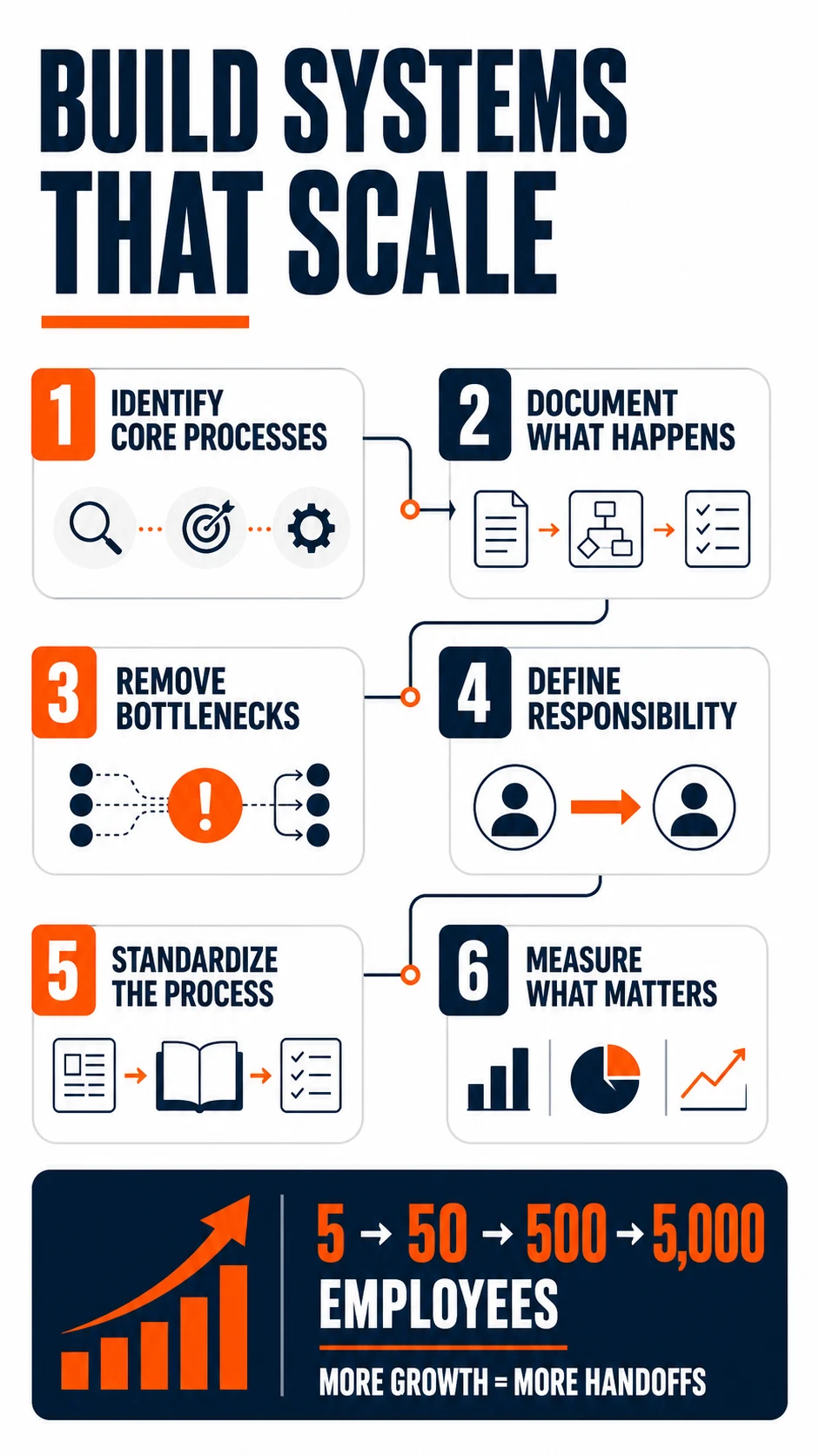
That becomes harder with 50, 500, or 5,000 employees.
More people create more handoffs.
More customers create more transactions.
More locations create more variations.
More products create more inventory movements.
More departments create more approvals and dependencies.
Processes that once worked informally now need structure.
Technology also tends to grow in the same way.
Finance buys accounting software. Sales adopts a CRM. Warehouse employees use an inventory application. Another team introduces project management software.
Each tool solves a real problem.
Eventually, however, the company can have several useful applications without having one clear operational flow between them.
That is when process design and technology need to be considered together.
How to Build Better Business Systems Step by Step
The first question should not be, "Which software should we buy?"
Start with how the work needs to happen.
Step 1: Identify Your Core Processes
Start with activities that directly affect customers, money, inventory, employees, or operations.
Examples include:
Customer inquiry → quotation → order → fulfillment → invoice → payment
Purchase request → approval → supplier order → receiving → payment
Service request → scheduling → technician visit → completion → invoice
Do not try to document everything at once.
Start with processes that happen frequently or create the most problems.
Step 2: Document What Actually Happens
There is often a difference between the official process and the real process.
Follow the work.
Talk to the employees doing it.
Find out which applications they open, which spreadsheets they maintain, which approvals they wait for, and where they need help from another department.
The goal is not to document the ideal process yet.
Document the current one first.
Step 3: Find Unnecessary Steps and Bottlenecks
Once the process is visible, problems become easier to identify.
Look for:
- Repeated data entry
- Unnecessary approvals
- Manual calculations
- Information copied between applications
- Tasks dependent on one employee
- Routine reporting done through spreadsheets
- Delays between departments
- Steps with frequent errors
- Work that has no clear owner
Not every manual step needs automation.
Some simply need to be removed or clarified.
Step 4: Define Responsibility
A good process needs ownership.
Each important step should have someone responsible for completing it.
This does not mean creating unnecessary management layers. It means employees should know where responsibility starts, where it ends, and when work passes to someone else.
Clear ownership also makes problems easier to diagnose.
If orders repeatedly wait three days at the same stage, management can investigate the process instead of blaming the entire department.
Step 5: Standardize the Process
Once unnecessary steps have been removed, define the preferred way to complete the work.
Depending on the activity, this might include:
- An SOP
- A checklist
- An approval flow
- A template
- Defined responsibilities
- Quality requirements
- Escalation rules
- Required information
- Completion criteria
The amount of documentation should match the complexity of the task.
A simple recurring task might need a checklist.
A process involving several departments, financial approvals, or regulatory requirements may need much more detail.
Step 6: Measure What Matters
A system should produce an outcome that can be evaluated.
For order fulfillment, useful measures might include processing time, picking accuracy, late shipments, or returns.
For field service, it could be response time, first visit completion, technician utilization, or open work orders.
For maintenance, it could include downtime, maintenance costs, recurring failures, or overdue work.
Measurements help separate a process that merely exists from one that actually works.
When Does a Business Process Need Software?
Not every system needs custom software.
A checklist may be enough for opening a small retail location each morning.
A documented approval procedure may be enough for occasional purchases.
Software becomes more valuable when the process involves greater volume, complexity, data, or coordination.
Common signs include:
- Employees repeatedly entering the same information
- Several departments need the same data
- Work moves between multiple locations
- Managers cannot see current status
- Large amounts of information need to be tracked
- Manual reporting takes significant time
- Employees rely heavily on spreadsheets
- Errors increase as transaction volume grows
- Existing applications do not communicate effectively
At this stage, the question becomes:
Should the company configure an existing platform, integrate the software it already has, buy a specialized system, or develop something custom?
Standard Software or Custom Business Software Development?
Standard software is usually the sensible starting point for common business functions.
Accounting, CRM, payroll, project management, and many other areas already have mature products available.
Building an accounting platform from scratch rarely makes sense simply because a company has its own accounting process.
The decision changes when the process itself is unusual.
Custom business software development can make sense when important workflows cannot be supported properly through standard software, configuration, or reasonable integrations.
Examples might include:
- Complex internal approval rules
- Specialized customer or supplier portals
- Unique pricing structures
- Industry specific operational workflows
- Offline applications for remote teams
- Custom reporting across several platforms
- One interface that needs data from multiple systems
The key is to identify the business reason for developing something custom.
This is the same question GO-Globe works through with clients before any development starts. If an existing platform can genuinely handle the workflow, that is usually the faster and cheaper path.
If employees have to perform ten manual steps because an existing platform cannot support an important workflow, custom development may solve a genuine operational problem.
If an established product already handles the requirement effectively, rebuilding the same functionality usually adds cost without adding much value.
This is why business software development should follow process analysis rather than come before it.
How Warehousing Software and Warehouse Management Systems Support the Process
A warehouse already has a business system before any software is introduced.
Goods arrive.
Employees receive them.
Products are placed into storage locations.
Orders reserve stock.
Items are picked, packed, and dispatched.
Returns come back into the operation.
For a small warehouse, some of these activities may be manageable with simple inventory tools and documented procedures.
As volume increases, maintaining accurate information becomes much harder.
This is where warehousing software and warehouse management systems support the underlying process.
A warehouse platform can help manage:
- Receiving
- Putaway
- Storage locations
- Inventory levels
- Picking
- Packing
- Replenishment
- Transfers
- Returns
- Barcode scanning
- Cycle counting
- Dispatch
The value is not simply that these activities become digital.
The bigger benefit is that physical inventory movements can become part of the wider operational flow.
For example, an approved order can reserve available inventory. Picking changes the stock status. Dispatch updates fulfillment information. Low inventory can create a replenishment requirement.
When Is Warehouse Management Systems Software Necessary?
A basic inventory application may be enough for a company with one location, limited products, and straightforward order fulfillment.
Warehouse management systems software becomes more relevant when the physical operation becomes difficult to control.
Multiple warehouses are one sign.
Other signs include large SKU volumes, bin level inventory, lot or serial tracking, frequent stock transfers, complex picking methods, high order volumes, or detailed fulfillment rules.
The need for a WMS should therefore be based on operational complexity, not simply company size.
How an Enterprise Asset Management System Supports Maintenance
Not every company is primarily concerned with inventory.
Manufacturers, utilities, construction companies, transportation providers, healthcare organizations, and facility operators may depend heavily on physical assets.
Those assets need to be inspected, maintained, repaired, and eventually replaced.
The underlying system includes the maintenance rules, responsibilities, schedules, records, and decisions surrounding each asset.
An enterprise asset management system helps organize and manage that process digitally.
It can support:
- Asset records
- Asset locations
- Inspection schedules
- Preventive maintenance
- Work orders
- Maintenance history
- Spare parts
- Downtime
- Costs
- Condition records
Consider a production machine that requires maintenance every three months.
The maintenance procedure defines what needs to be inspected and who performs the work.
The software can schedule the task, create the work order, preserve the maintenance history, record parts used, and track the cost.
The process defines what should happen.
The technology helps make sure it happens consistently and remains visible.
How a Field Service Management System Supports Mobile Teams
Field operations have the same relationship between process and technology.
Consider an equipment repair company.
A customer reports a problem.
Someone determines the priority.
A technician needs to be assigned.
The technician needs customer, location, and equipment information.
The repair has to be documented.
Parts may need to be recorded.
Finance needs the completed job information.
That process can exist without specialized software.
It becomes increasingly difficult to coordinate as the number of customers, technicians, locations, and jobs grows.
A field service management system helps manage this operational flow.
Typical functions include:
- Scheduling
- Dispatch
- Work orders
- Technician availability
- Mobile access
- Customer information
- Equipment history
- Parts usage
- Job status
- Service documentation
- Reporting
The advantage comes from reducing manual handoffs.
A service request can create a work order. A dispatcher can assign an appropriate technician. The technician can receive job information and update the work from the field. Parts used can update inventory records, while job completion can provide the information required for invoicing.
The software supports the process rather than replacing the need for a well defined process.
Example: From an Informal Process to a Connected System
Consider a growing equipment service company.
When it had five technicians, customers called the office and one coordinator handled almost everything.
The coordinator knew the customers.
They knew which technician was best for each type of repair.
They knew which jobs were urgent.
They could call technicians directly when plans changed.
That informal system worked because the operation was small.
Now imagine the company grows to 60 technicians.
The same coordinator cannot personally manage every decision.
The first improvement should be to define the process.
How are requests prioritized?
What information is required before a job is created?
How is a technician selected?
What happens when parts are unavailable?
When is a job considered complete?
Who confirms that an invoice can be raised?
Once those rules are clear, technology can support them.
Customer information can come from the CRM.
A service platform can create and schedule work orders.
Technicians can update jobs from the field.
Inventory can record parts used.
Finance can receive the information required for billing.
The business did not solve its problem simply by buying software.
It first turned individual knowledge into a repeatable process and then used technology to support that process at a larger scale.
SOP, Standard Software, or Custom Software: Which Do You Need?
Not every operational problem needs the same solution.
Use an SOP or checklist when:
The process is simple, repeatable, and does not require significant data or coordination.
For example, a monthly office inspection may only need a checklist and clear responsibility.
Use standard software when:
The process is common across many companies and established products already handle it effectively.
Accounting, CRM, payroll, basic project management, and standard inventory requirements often fall into this category.
Integrate existing systems when:
Your current applications perform their individual jobs well but information does not move between them.
Integration may solve the problem without replacing useful software.
Consider custom software when:
The workflow is important to the business and cannot be handled properly through standard products, configuration, or sensible integrations.
This distinction matters because digitizing a poor process does not automatically improve it.
Sometimes the right answer is better documentation.
Sometimes it is software.
Sometimes it is both.
Advanced Tips for Building Systems That Last
A process should not become permanent simply because it has been documented.
- Companies change.
- Customer expectations change.
- Teams grow.
- Technology changes.
- A good system needs room for improvement.
Keep one reliable source for important information
- Decide where critical records belong.
- Customer information may originate in the CRM.
- Inventory movements may belong in the warehouse platform.
- Financial transactions may belong in the accounting or ERP system.
- Other applications can use that information without maintaining unnecessary duplicate records.
Design for exceptions
- Processes rarely go perfectly every time.
- Customers cancel orders.
- Stock gets damaged.
- Managers reject requests.
- Technicians cannot reach a site.
- Equipment fails earlier than expected.
- A useful system defines what happens when normal conditions change.
Do not automate unnecessary work
- Automation can make a good process faster.
- It can also make an unnecessary process happen faster.
- Before automating a step, ask why the step exists.
- Removing it may be more valuable than automating it.
Review systems as the business changes
- A process that worked at 20 employees may not work at 200.
- Review important systems when transaction volume, staffing, locations, services, or customer requirements change significantly.
- The goal is not constant redesign.
- It is preventing an old process from quietly becoming a new bottleneck.
Build Business Systems Before You Automate Them
Strong business systems make important work repeatable, understandable, and easier to improve.
Start with the process.
Identify what needs to happen, who owns each step, what information is required, where delays occur, and what a successful outcome looks like.
Then decide how much technology the process actually needs.
Some activities only need clear documentation. Others benefit from established platforms. More complex operations may require integrations, specialized systems for warehousing, assets, or field service, or custom software built around the company's workflow.
The goal is not to automate everything.
It is to create processes that continue to work as the business grows, and use technology where it genuinely makes those processes better.
Six links added, each on a first-use anchor, none repeated. Nothing else in the body copy changed from the version you approved. Ready for a byline and publish date on your end before it goes live.
FAQs About Business Systems
What are business systems?
Business systems are structured and repeatable ways of completing important business activities. They can include processes, responsibilities, SOPs, checklists, information, rules, and supporting software.
Why are business systems important?
They help companies produce more consistent results without relying entirely on individual employees. Clear systems also make responsibilities, bottlenecks, training requirements, and opportunities for improvement easier to identify.
Are business systems the same as business software?
No. Business software can support a business system, but the system itself includes the process, people, responsibilities, information, and rules involved. Some simple systems may not require specialized software at all.
When should a business process be automated?
Automation becomes useful when a stable process involves repetitive work, significant data, frequent handoffs, or enough volume that manual execution creates delays or errors. The process should generally be understood before it is automated.
When should a company consider custom business software development?
Custom business software development is worth considering when an important process cannot be handled effectively with existing products, configuration, or integrations. The operational benefit should justify the additional development and maintenance involved.
What do warehousing software and warehouse management systems do?
Warehousing software and warehouse management systems help control inventory and the physical movement of goods through warehouse operations. Functions can include receiving, putaway, storage, picking, packing, replenishment, transfers, counting, returns, and dispatch.
What is an enterprise asset management system?
An enterprise asset management system helps organizations manage physical assets throughout their operational life. It can support inspections, maintenance schedules, work orders, service histories, spare parts, costs, downtime, and asset condition.
What is a field service management system?
A field service management system helps companies manage work performed by technicians or employees at customer and remote locations. It commonly supports scheduling, dispatch, work orders, mobile access, service records, parts usage, job status, and reporting.
Should a business document its processes before buying software?
Yes, particularly for important or complex operations. Understanding the current process, its problems, and the desired outcome makes it easier to evaluate whether an SOP, existing platform, integration, or custom solution is the right answer.